Incoming-type splits
A reading: how did we trade against one kind of incoming attack
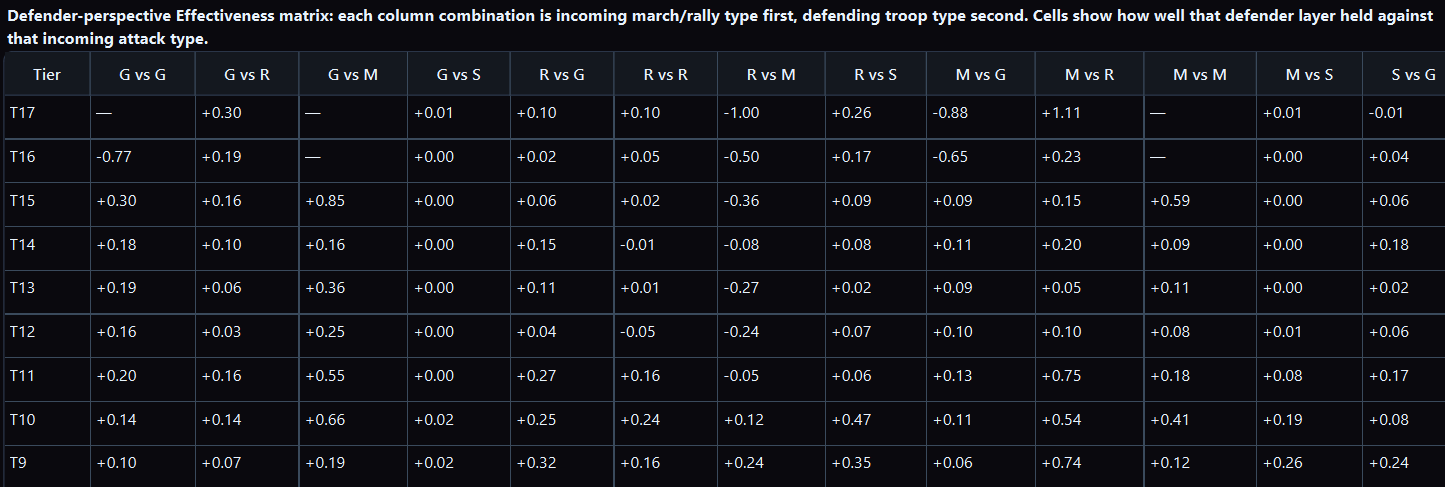
A defense table that is not split by what hit you is often one story covering four. Siege incoming and ranged incoming are not the same exam. Averaging them produces a personality (“our ground is bad”) that may be false.
By hand you tag every incoming report with a type and rebuild every comparison. That is why the tag never happens.
Focus
Stay on a defense slice (a player, the team’s incoming, main-only). Then split the same look by incoming troop type — do not leave the idea, and do not silently jump to “our attacks of that type.”
If you instead want “our ranged rallies,” that is a different subset (team commitment).
Why this used to be impossible by hand
The mailbox is not filed by incoming type. Your memory is filed by the last rally that hurt. The library can regroup the same holds.
Questions (any wording)
- Split this defense table by the troop type that hit us.
- How did we trade against incoming siege vs incoming ranged?
- Which incoming type produced the breaches, and which just produced noise?
- Same Effectiveness question, but only the rows where they sent mounted.
- Did this type’s trade change by incoming type, or by which keep we were on?
- Did the reins that were missing matter more against one incoming type than another?
What a good answer looks like
The same metrics you were already looking at, repeated per incoming type (or a comparison table). Clear that this splits these defenses by what hit you, rather than switching over to our offense.
Common miss
“By troop type” with no word for whose type. Offense type and incoming type are different axes. Say “incoming” or “what they sent.” If the Analyst moves to team attacks, pull it back. Staying vs moving.
Averaging every incoming type invents a false personality.
Siege and ranged are different exams; the mailbox is not filed that way. Import the battlefield, stay on a defense slice, then split the same look by what they sent — so “our ground is bad” is either true for that incoming type or it isn’t.
New customers can start with a 7-day trial. Plans start at $14.99/month with full feature access.