How Tactica works
Two jobs stand between your reports and the questions you want to ask them. The first is getting full reports out of the game into a structured battlefield library. The second is asking that library something no single report can answer — which Tactica’s Battlefield Analyst does by summarizing the event, then building the closer look you ask for. Both used to take a weekend. Both now take minutes.
From reports to a structured battlefield in minutes.
Tactica imports full reports and consolidates them into a structured, de-duplicated battlefield. Read and Bulk Read work with any ADB-compatible emulator; Fast Read imports favorited reports on MuMu in minutes. Battlefield Analyst then helps you investigate the event and inspect individual battles.
New customers can start with a 7-day trial. Plans start at $14.99/month with full feature access; higher-usage plans are available. Read and Bulk Read work with any ADB-compatible emulator; Fast Read currently requires MuMu.
How does Tactica import Evony battle reports?
Tactica pulls battle reports out of the game into your library. You do not screenshot the report, assemble a PDF, or pick a folder of images. There are two import paths.
A battlefield is a two-hour event with many individual battles. The more of those battles you take the time to scan, the more useful the library and Battlefield Analyst are for that battlefield.
What is Fast Read?
Fast Read loads hundreds of full reports into Tactica in minutes — what Read / Bulk Read would take days to walk screen-by-screen. It does not open each report in the game. It still captures the full main, buffs, and details data, not a summary-only skim, and it does so without the OCR glitches Read / Bulk Read has always had to contend with.
Favorite the reports you want to review, then Fast Read imports them on MuMu Player (official site). Evony shows favorited reports in Saved; that is the mailbox Fast Read reads. A dedicated MuMu instance just for Fast Read is enough, even if you normally play on another emulator. Fast Read does not work on BlueStacks. Tactica does not sell or support the emulator. Empty keeps are skipped. Capture can miss some reports; run Fast Read again and it continues without duplicates. Keep Tactica open until it finishes. Tactica gets what it needs from the game on MuMu and sends it to Tactica’s systems.
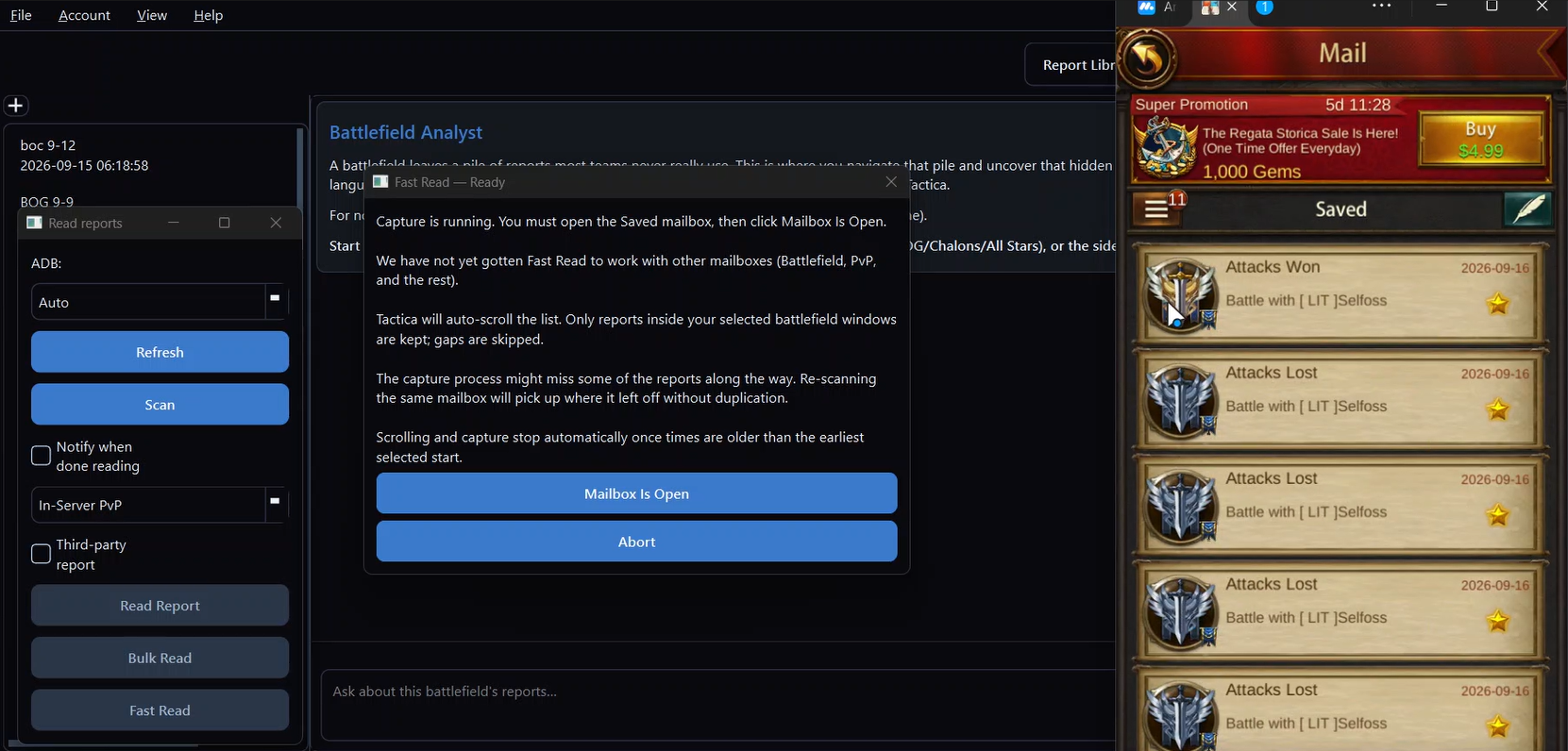
See Fast Read turn favorited reports into a battlefield library.
This real-time clip shows Fast Read scrolling a favorited mailbox until 61 full reports are read. Upload runs in the background throughout.
You can start reading reports into Tactica within minutes of starting your trial. Plans start at $14.99/month with full feature access; higher-usage plans are available.
What is Read / Bulk Read?
Read / Bulk Read is the import path for any ADB-compatible Android emulator: Tactica drives the Evony UI. You can import one report at a time, or sweep a mailbox for all reports from a single battlefield. For each report it opens the report, taps and scrolls through the main screen, the buffs screen, and the details screen until every number has been exposed, then stores a structured record and returns to the mailbox. That is specialized UI automation for Evony — not document parsing of screenshots you captured by hand.
That path takes minutes per report, not seconds. How long depends on the number of participants (attackers plus defenders) and how many layers of troops they have. Rally cards will keep you joining monster rallies — and collecting those resources — while you use Read / Bulk Read. And with the alliance option, you can spread that effort across multiple accounts.
Does it require manually capturing every page of a report?
No. You do not screenshot every page. Fast Read does not open each report in the game and still captures main, buffs, and details. Read / Bulk Read completely automates tapping and scrolling through every element of the battle report and retains every number for later analysis.
What data does Tactica extract and store?
Tactica stores the numbers from the in-game report, not a summary-only rollup. Each structured record includes marches and troop layers (type, tier, survived, killed, wounded, deserter, holy palace, killing), generals, buffs and debuffs, and timestamps.
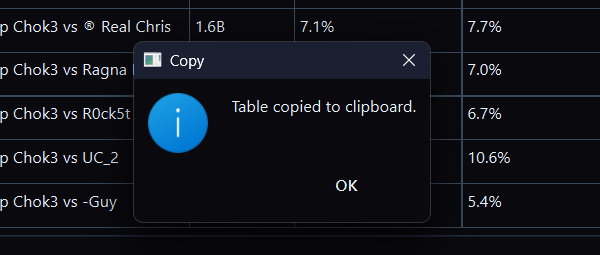
That granularity is why Battlefield Analyst can build views such as a defense timeline with rein swaps and missing layers, or an attack sequence breakdown. Reports are kept indefinitely; there is no storage cap. The on-disk format is proprietary. There is no CSV or JSON dump of the library. Tables generated in Battlefield Analyst include a copy button so you can paste them into a spreadsheet.
What is Tactica’s Battlefield Analyst?
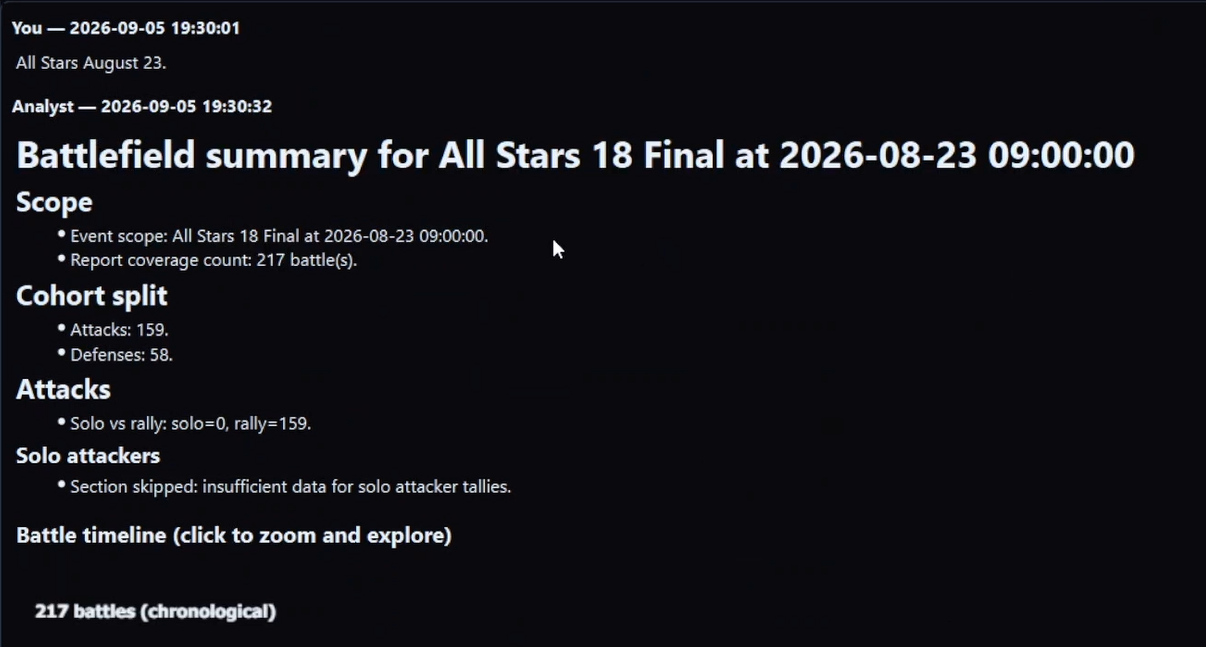
After a battlefield’s reports are loaded into Tactica, you start by telling Battlefield Analyst which battlefield to look at. The first summary is the map of what to look at more closely. Then you ask it to look at that more closely — any way you want — in plain language. Battlefield Analyst plans the work and runs it against your structured battlefield data — returning answers and enriched views (hit-sequence timelines, movements, team/player behavior) that you cannot practically assemble by reading reports one at a time or by pasting a few screenshots into a general AI.
Chat is how you ask. Battlefield Analyst is the product. Analysis focuses on one battlefield at a time. Runtime is in minutes. Your reports stay in your Tactica library; the Analyst runs on that data in Tactica’s own systems — not by uploading reports to a public chatbot.
How to drive it once a battlefield is loaded — name a slice, then ask — is the core loop.
Your reports are loaded. Now investigate what happened.
You can start reading reports into Tactica within minutes of starting your trial. Plans start at $14.99/month with full feature access; higher-usage plans are available.
How do you go from a pile of reports to a closer look?
- Import that battlefield (Fast Read on MuMu for favorited reports, or Read / Bulk Read on any ADB-compatible emulator).
- Point Battlefield Analyst at that battlefield. The first summary shows which enemy keep you kept hitting, which teammate took repeated hits, and what else is worth time.
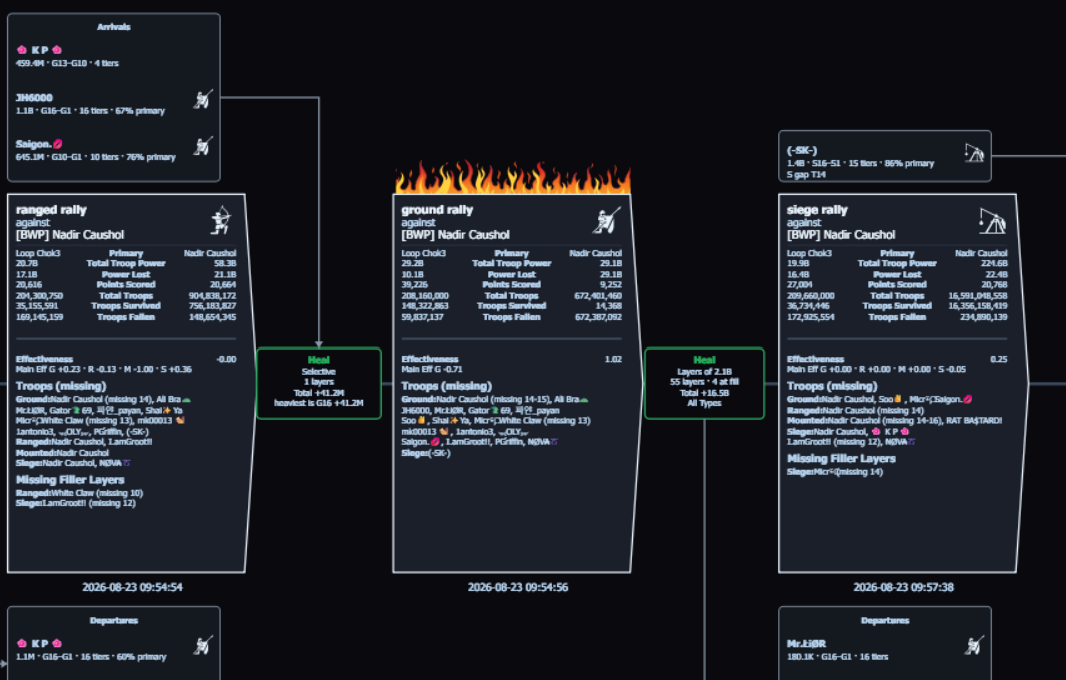
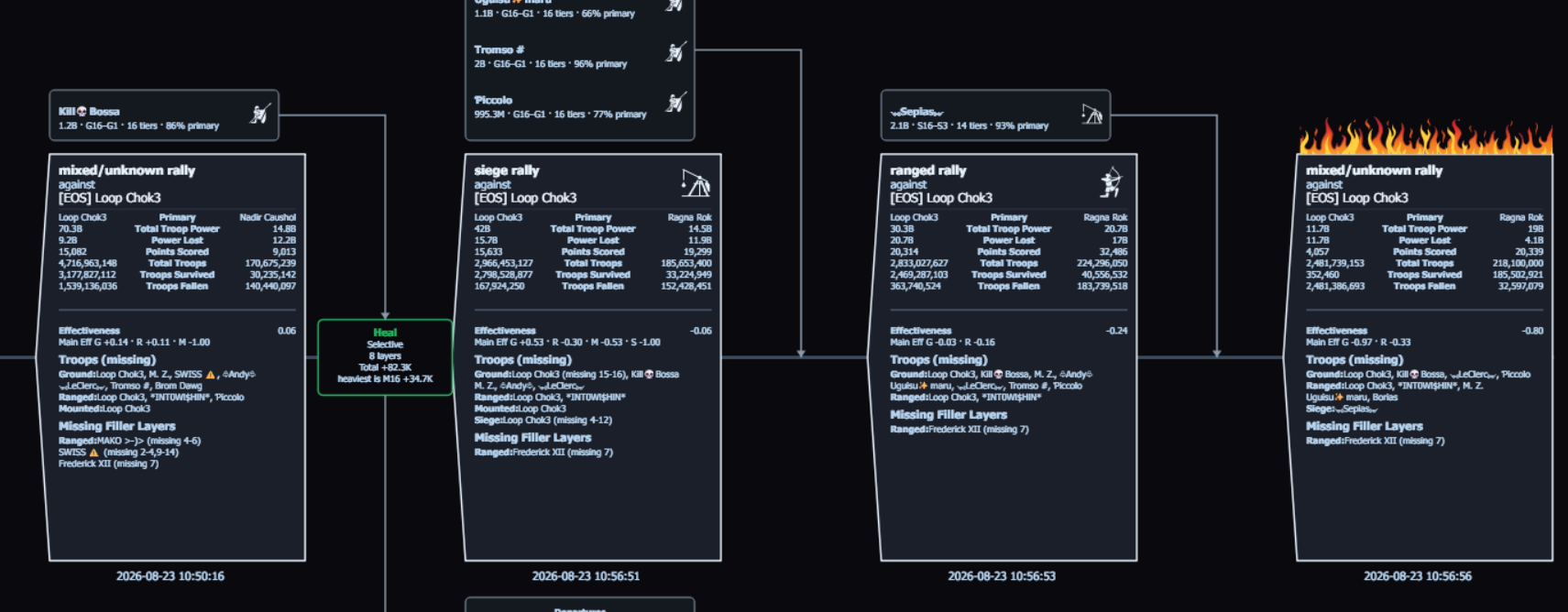
- Ask for that closer look. A hit-sequence timeline on a keep you tore down is one of those views — every hit in order, with heals and movement between them. A teammate who got hit repeatedly is a different closer look on their keep. You can also ask for the team’s rallies of one troop type, or any other slice.
A mailbox of full reports is dozens of screens per fight. Doing that by hand is thousands of images. The timeline is the analysis of that slice, not a preview you paste into a general AI.
What can Battlefield Analyst show me from a whole battlefield’s reports?
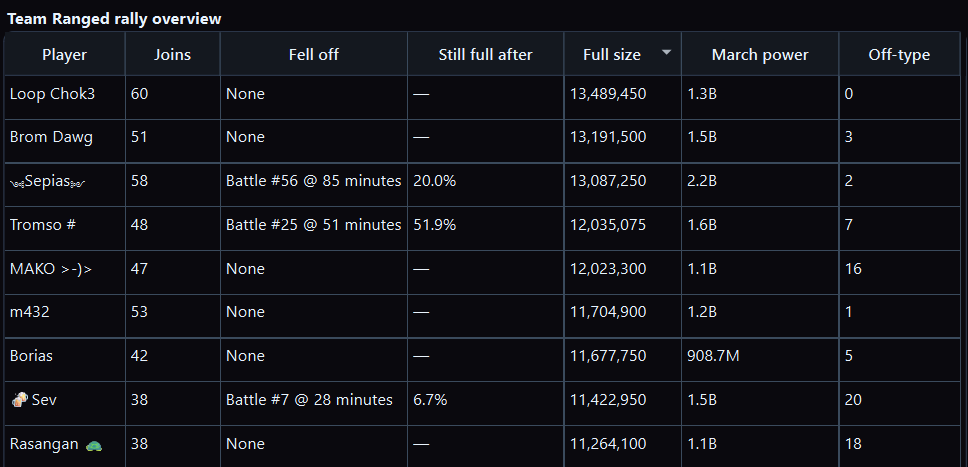
You identify what you want found in the data, and Battlefield Analyst works with you in plain language to design fully custom analysis — not a fixed menu of reports. That holds whether you are looking at 2 reports or 200 from the same battlefield. Ordinary reading cannot practically do either at this depth. The Analyst finds what you asked for in the structured library and returns answers plus enriched views.
The hit-sequence timeline above is the tear-down of an enemy keep. When a teammate takes repeated hits, the same class of view is incoming attacks on their city — healing along the way, and every movement of reinforcements in and out, including reins swapped and missing layers.
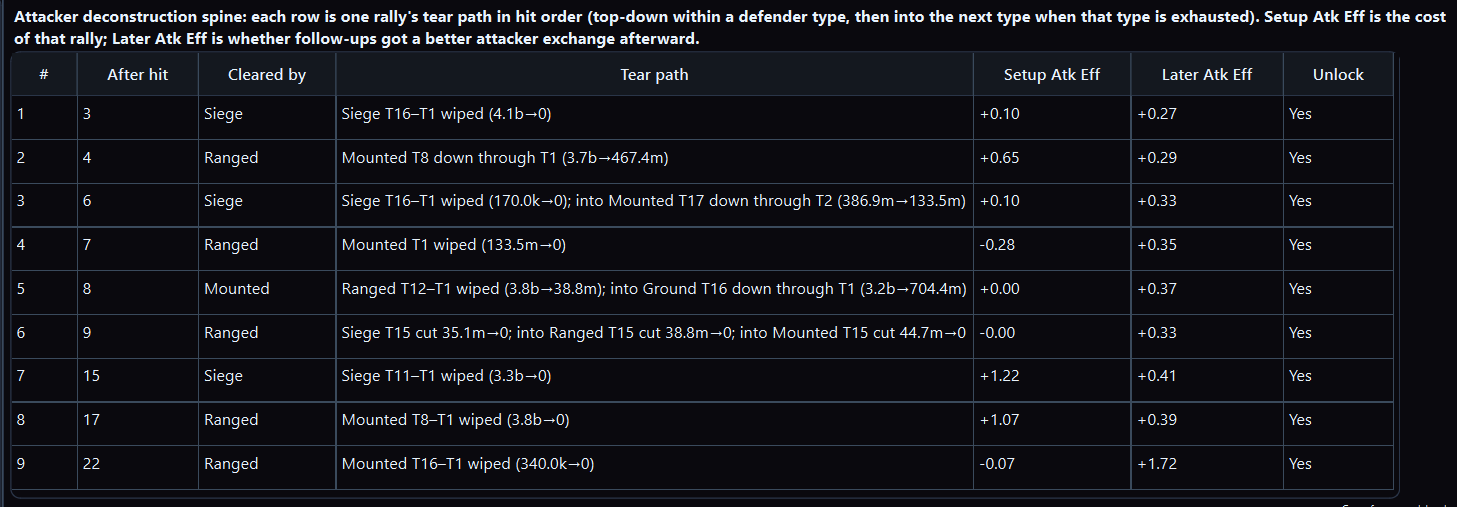
The same data supports other enriched views, such as an attack sequence breakdown of how layers were affected across a fight. It also computes Effectiveness — Tactica’s cost–benefit metric for troops in a fight: what they returned relative to what they put at risk. Evony’s scoreboard shows points scored, not points given up, so it cannot measure that trade. You can compare troop types and tiers, teammates, or full rally joins versus depleted (dust) joins. How to measure the effectiveness of different troops in Evony.
You can also name a combination of those library measures — plus, minus, times, divided by, and constants — and ask for the lowest, typical, highest, and spread of that column. Prefer Effectiveness when that is the trade you mean. You cannot invent the in-game scoreboard from kill counts.
How is this different from pasting reports into ChatGPT / Perplexity?
Pasting a few screenshots into a general AI is not bulk collection and cannot surgically analyze a full battlefield’s reports. Tactica imports reports into a structured library first. Battlefield Analyst then plans custom analysis over that data in Tactica’s own systems and builds enriched views — so you are no longer forced to ignore most of the data.
| Approach | What happens | What stays unanswered |
|---|---|---|
| Closed the report | Opened the detail pages, got overwhelmed, closed them | The numbers stay unused — which hit opened the wall, and who gave points away, stay unknown |
| Skimming a few reports by hand | Read 2–3 fights in detail | Most of the pile stays ignored, so whether the pattern repeated is still a guess; no view that spans reports |
| Spreadsheets | Manual entry of troop counts — the honest method when someone actually does the work | Doesn't scale to hundreds of reports, and rarely keeps buffs, layers, or rein movement — so you cannot ask about them |
| Screenshots into a general AI (e.g. ChatGPT / Perplexity) | Paste images/text, ask for a summary | A few images, not thousands of screens; no bulk collection, and no hit-sequence over a keep to ask about |
| Tactica + Battlefield Analyst | Fast Read imports hundreds of full favorited reports in minutes on MuMu without opening each report — full main, buffs, and details, no OCR glitches. Read / Bulk Read walks every screen on any ADB-compatible emulator. Battlefield Analyst then runs custom analysis over that library | Nothing about reports you did not import. Windows; Fast Read needs MuMu; Read / Bulk Read needs an ADB-compatible emulator |
How does alliance sharing / the shared library work?
If multiple users from the same alliance subscribe, they can join up in Tactica to share their library of reports and split responsibility for reading reports into the system.
If connected members set up bulk reads of the same battlefield at the same time, Tactica coordinates between them so the same report is not scanned twice. That lets the alliance cover more of the mailbox without duplicating the minutes each scan takes. Alliance view-only is $2.49/month; Rally Squad is 10 seats for $17.99/month (about 28% less than ten $2.49 seats). Those seats can use the shared library and notes without an emulator; bringing new reports in still requires a full subscription. Right after a battlefield, favorite the reports, Fast Read them, then ask Battlefield Analyst while the event is fresh.
What would the first summary say about your last event?
Install Tactica now, then begin reading reports when your next serious event is ready to review. The reports you favorited after the last one would work too.
Evony keep hit-sequence timeline · What is Fast Read? · FAQ · How to measure Evony troop Effectiveness · After-action review after a battlefield · Why one Evony battle report is not enough · How to analyze hundreds of Evony battle reports · Battlefield Analyst cookbook · Download Tactica