The core loop
This is the intended way to use Battlefield Analyst. Other paths exist. This is the one the system is built around.
Select a battlefield
        ↓
   First summary
        ↓
Name a subset (any criteria you can say)
        ↓
Summary of the new focus
   (sometimes also denser reporting)
        ↓
Ask your own questions about *this* focus
        ↓
   Stay and go deeper, or name a new subset
Analysis is one battlefield at a time. Runtime is minutes, not a weekend. Depth scales with how complete that battlefield’s report set is.
Chat is how you ask. You do not pick an analysis from a ribbon of buttons.
Step 1 — Select a battlefield, read the first summary
Tell the Analyst which battlefield to look at (the event whose reports are already in your Tactica library).
The first summary is a door, not the analysis. It is a reading of the pile: what is worth time, what is thin — not a dump of every fight. An enemy keep you kept hitting, a teammate who got hit repeatedly, where the team’s rallies of a type sat, obvious gaps in coverage. It is not supposed to answer every question you will care about. Numbers, and the reading.
If the summary feels thin, the usual cause is the library, not the Analyst: too few reports from the accounts that actually fought. Load more of that same battlefield, then select it again. The Analyst cannot invent fights that were never imported.
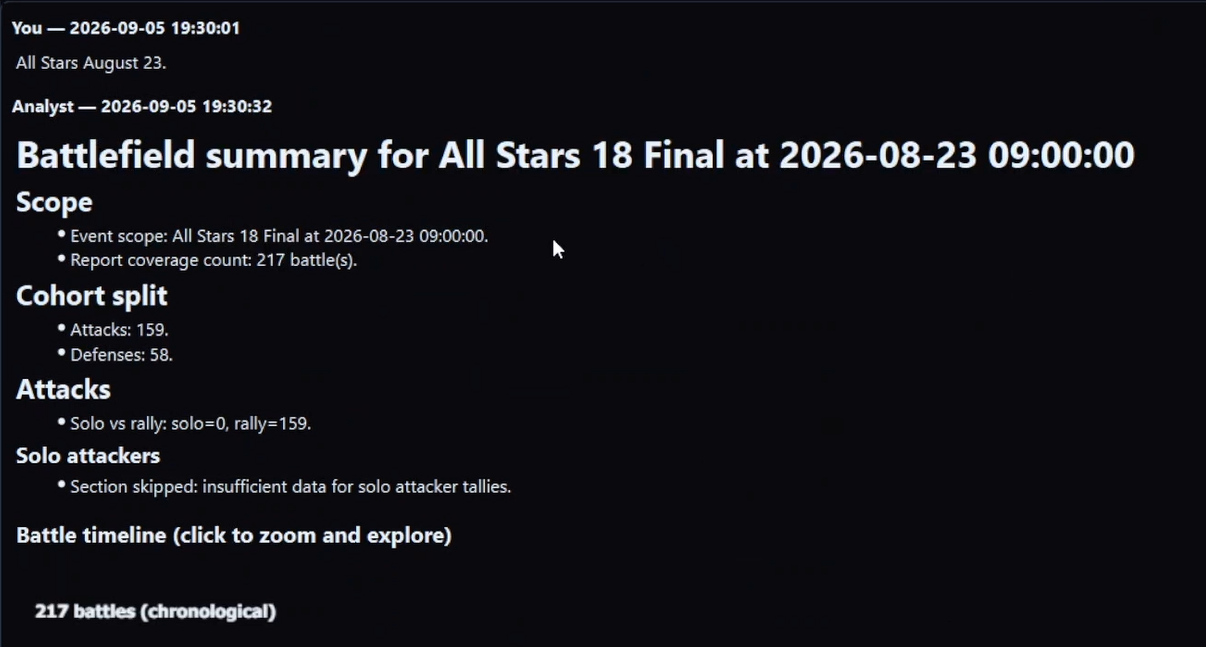
Step 2 — Name a subset of that battlefield
Ask the Analyst to look at a slice, not to “run a report.”
A subset is any group of fights you can describe:
- One side of the event (our attacks, our defenses)
- One player (their marches, or only their defenses, or only their joins)
- One keep or city (hits we landed, or hits they took)
- One troop type, or rallies vs solos
- Main defender vs reinforcing someone else
- A quality you care about (“the ones that went badly,” “after we started sending dust,” “only the fights with a full ranged join”)
- A combination of the above
You are not choosing from a closed list. If you can say the criteria in the same language you would use in voice comms, try it. If the cut is ambiguous, the Analyst should ask — not silently pick a favorite default.
Naming a subset has more examples. The point here is the move: you are changing where the Analyst is looking. You are not yet asking the detailed question you came for. You can combine those in one breath (“look at her defenses and tell me which reins swapped”), but the system still does the same two jobs: shift focus, then analyze.
Step 3 — Read the summary after the focus shifts
When the Analyst accepts a new subset, that subset becomes the current focus. You should get a summary of this slice: what is in it, how big it is, what stands out from here. That writeup is a reading of the new pile, not just a count.
That second summary is as important as the first. It is how you confirm you landed where you meant (“this is her twelve main defenses, not the whole team’s incoming”). It is also how you see whether the slice is large enough to support the question you have in mind.
For some subsets, that summary comes with richer reporting — a hit-sequence timeline on one keep, a table of the team’s rallies of one type, a walk through one player’s rallies of one type, a defense timeline with rein movement. Those slices support denser answers because the reports line up that way.
Treat that richer reporting as a useful starting point, not as the end of the conversation. When a slice gets richer reporting lists common examples. You do not need to memorize that list to use the Analyst well.
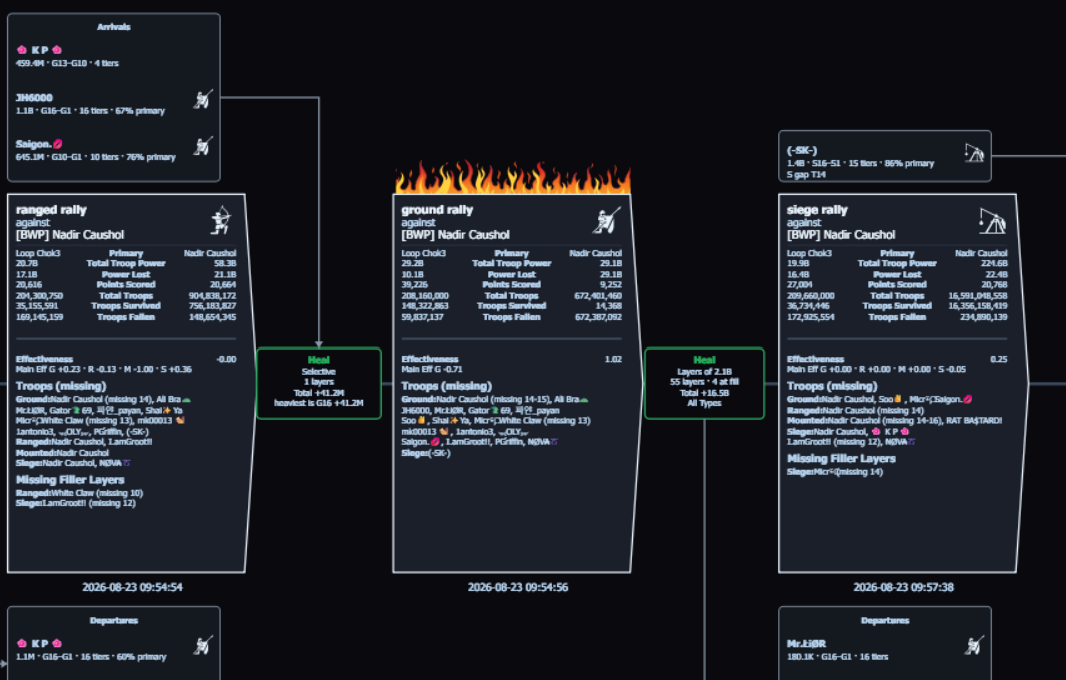
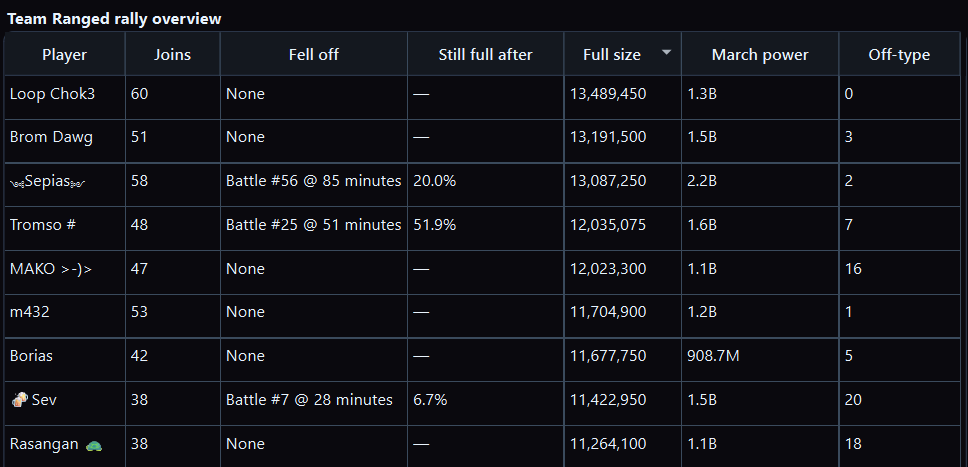
If you focused a subset that does not come with denser reporting on the way in, that is normal. You still have a focus and a summary. Step 4 is where most of the power is.
Step 4 — Ask your own questions about the current focus
This is the step the rest of the product is for.
You are no longer talking about “the battlefield.” You are talking about this slice. Ask what you actually want:
- Who traded well, and by what measure
- How a troop type or tier band did against what it risked
- When someone fell off, and whether later joins were still full
- Which layers did the damage on a hold
- Whether the ugly fights share a target, a troop type, or a missing rein
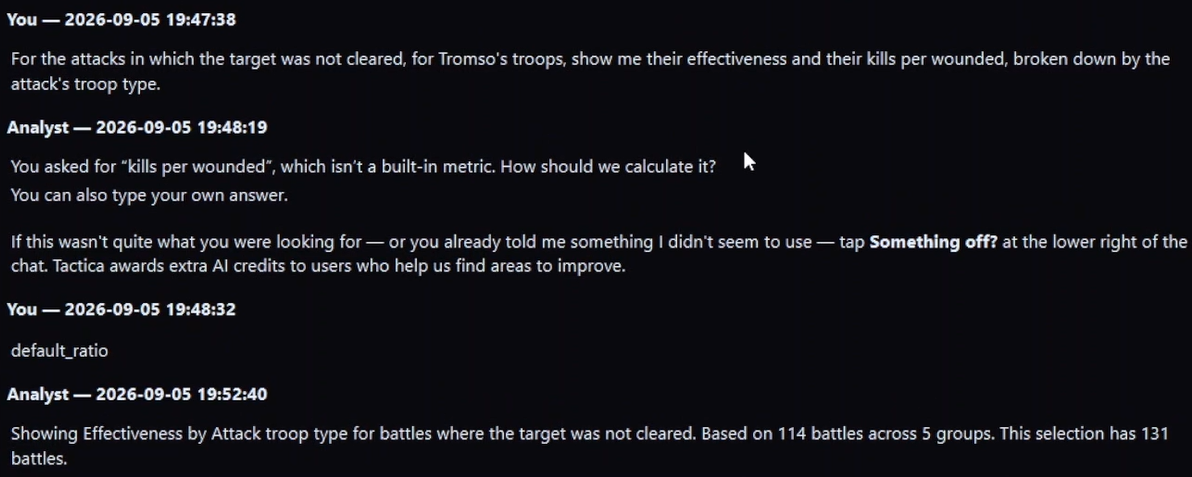
- A table you can copy, a comparison, a “split that same look by incoming type”
- A combination of the library’s numbers you name (plus, minus, times, divided by, constants)
You are not limited to the slices that already get denser reporting. The Analyst plans custom analysis against the structured reports in the current focus and builds views from that — narrative, tables, diagrams — in minutes. Ask for the grid when you want computation. Ask what the grid means (train-more, why this result, dust vs buff) when you want the reading. Numbers, and the reading.
How to aim those questions: After the summary.
Two worked paths
Path A: Richer reporting on the way in, then the real questions
- You select last night’s battlefield. The first summary names an enemy keep you tore at for a long time, and a teammate who got hit repeatedly.
- You ask to look at hits on that enemy keep. The Analyst shifts. You get a hit-sequence timeline: every imported hit in order, with heals and movement in the gaps.
- That timeline is the wow. It is not the finish. You then ask, still on that keep: which hits went negative on points while still stripping a layer; whether siege should have continued one more wave; which of our joiners were already dusty by the later ranged rallies.
- Those answers are custom analysis on the current focus. No button produced them.
Path B: Any named slice
- Same first summary.
- You ask to look at our main-defender fights against incoming siege rallies. That is a narrow, named cut. You still get a summary of that slice: how many fights, what stands out.
- You ask for a table of points given up by troop type on the defending side, then who reinforced those holds, then whether the bad results share a missing high-tier layer.
- You never waited for a special show. You used the system as designed.
Path B is not an advanced mode. It is the general case. Path A is the general case when that slice also supports denser reporting on the way in.
What to do next
- Stay on the focus and ask another question: staying vs moving.
- Or name a different subset and take a new summary.
- If you want examples of step-4 asks that are not “run the default view again,” see recipes.
- If you want the large map of questions that used to be too expensive to answer, see the question atlas and why this used to be impossible.
- Full list of ways to cut the pile: naming a subset. What you can do with the numbers on that pile: numbers and shapes.
Use the loop on your next battlefield.
Load the reports, start with the event summary, then drill into the battles and questions that matter.