See what actually happened across the whole battlefield.
Your battlefield reports hold more than any single fight shows: who on your team actually traded well, when marches were depleted, what changed on a keep between hits. Tactica brings that out — including things you may never have thought to look for.
Once your reports are imported, name the event and date — BOC, Chalons, All Stars. Battlefield Analyst gives you a useful overview of that battlefield, calls out specific findings, and points to places worth investigating. Then you follow whatever interests you in ordinary language. You do not need to understand report matrices, come with a question, or set up analytics first.
Importing comes first: Fast Read brings in favorited reports on MuMu in minutes, and Read and Bulk Read work with any ADB-compatible emulator. Battlefield Analyst works from the reports you have imported.
New customers can start with a 7-day trial. Plans start at $14.99/month with full feature access. The download is the Windows installer; you create an account and start the trial after you install.
The hit that scored wasn’t necessarily the hit that made the breakthrough possible
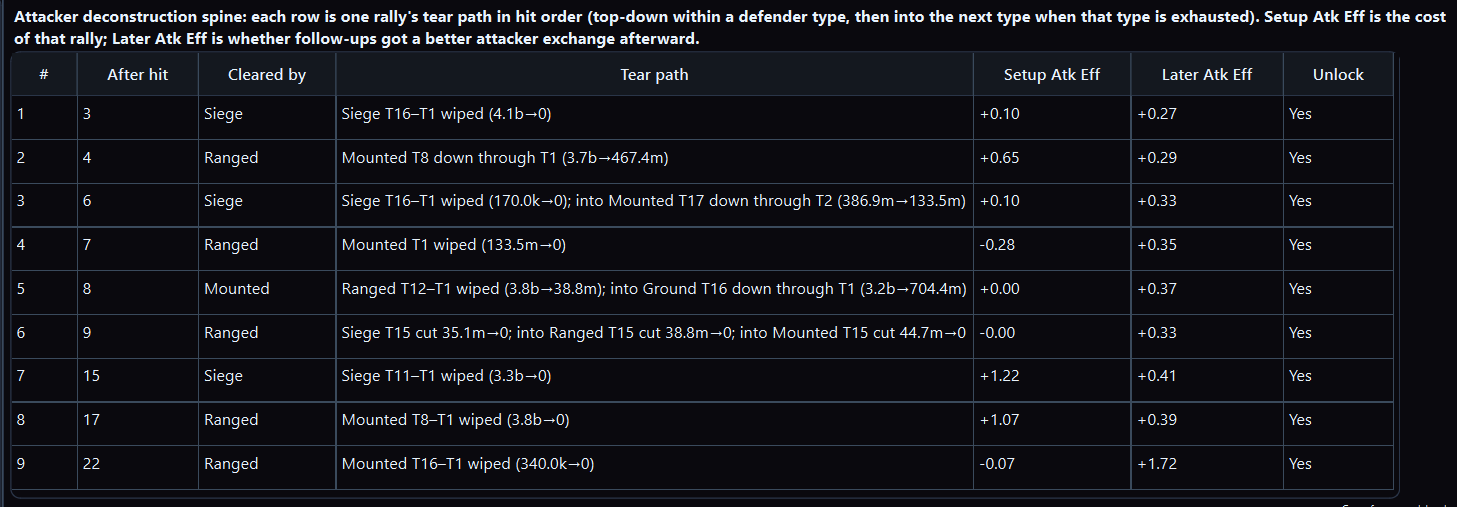
On one keep tear-down from a real imported battlefield, several rallies came out flat or negative on their own exchange. They wiped or cut defender layers, and the rallies after them traded better. A scoreboard argument throws those hits out; the sequence shows them as part of the tear-down. Seeing that by hand means opening every report on the keep and holding the order in your head, so teams usually remember the last hit instead.
How to read the table: each row is one rally, in hit order. The tear path is the defender layers that rally wiped or cut. Setup Atk Eff is that rally’s own exchange. Later Atk Eff is whether the rallies after it traded better.
Rows where setup is flat or negative and later exchange is positive are hits that did not win on their own and still changed the wall. The full reading. Click to enlarge.
Three more things already in your last battlefield’s reports
These are arguments teams already have on voice. Each one is settled across many reports, not by a closer look at one — and you already have the reports.
The scoreboard does not show points given up. Being on every full march is not Effectiveness, and Exchange Ratio can move because a teammate’s march was depleted.
Fast Read on MuMu, or Read and Bulk Read on any ADB-compatible emulator. The reports become a structured library of full reports, not a folder of images.
2
Name the event and date
BOC, Chalons, All Stars — whichever battlefield you fought, and when. No questions to write and nothing to configure.
3
Read the battlefield summary
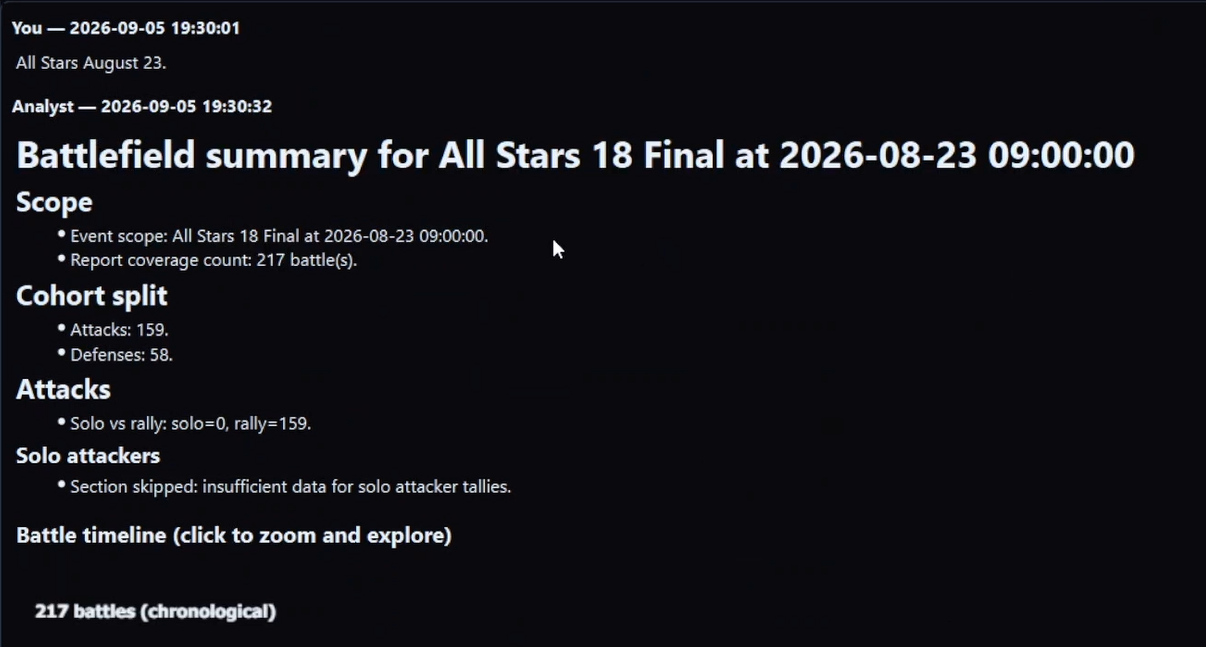
A useful overview of the battlefield in minutes, covering several sides of it, with specific findings and clear starting points for deeper investigation. It is worth reading whether this is your first battlefield or your hundredth.
4
Follow what interests you
Ask in ordinary language: “Let’s look more closely at this player’s defenses.” “Show me the attacks on this keep.” “What did this teammate’s participation in ranged rallies look like?” Battlefield Analyst identifies the relevant players and reports and plans the work; Tactica’s analytical tools compute the results and build views such as the hit-sequence timeline, inside Tactica rather than in a public chatbot. Advanced users can specify their own cohort criteria and metrics, but nobody needs that to start.
A first battlefield summary: an overview of the battlefield, specific findings, and starting points for a closer look. Click to enlarge.
The reports show who was actually in the city between hits
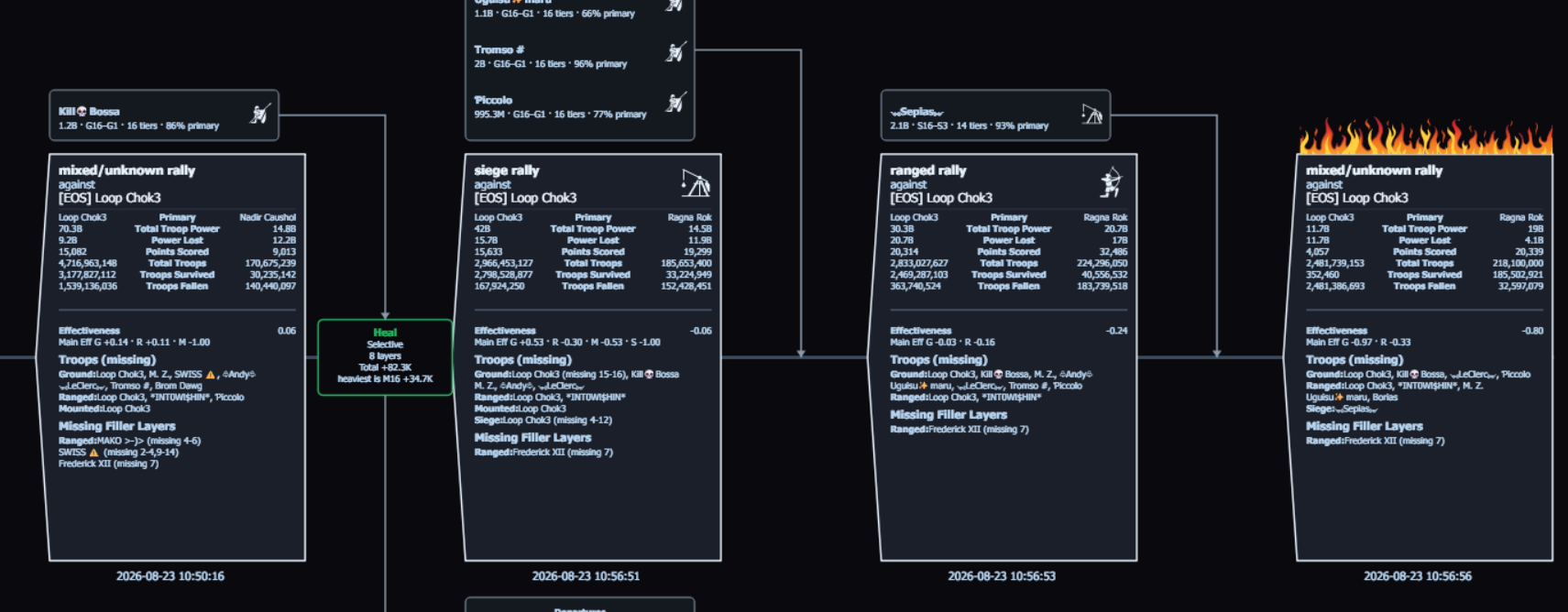
A follow-up on a teammate’s defenses can look like this. Incoming hits on that city are lined up in order, with heals and reinforcement movement in the gaps, so you can see who was primary on each hit, which layers were already missing, and when troops left or came back. What it cannot tell you on its own is that one reinforcement is the reason the city held.
Defender sequence on a teammate’s city — incoming hits, heals, and rein movement — from the imported reports. Who was in the city when it held. Click to enlarge.
What would it find in the battlefield you just fought?
Import that battlefield’s reports, name the event and date, and see what the summary turns up. Then follow whatever catches your attention.
New customers can start with a 7-day trial and begin reading reports within minutes. Plans start at $14.99/month with full feature access. Why one report is not enough.
The details
Automated import
Read and Bulk Read work with any ADB-compatible Android emulator, importing one report or sweeping a mailbox by walking every report screen. For the faster path, favorite the reports you want and Fast Read imports hundreds of full reports in minutes on MuMu Player (official site) without opening each one. What is Fast Read?
Analytics & alliance library
Sort by participant, troop type, or tier. Visualize kills and points. Keep reports indefinitely. Alliance members who subscribe can share one library and split the scanning — Tactica coordinates simultaneous bulk reads so the same report is not scanned twice. View-only alliance members do not need an emulator.
Battlefield Analyst
One battlefield at a time. Beyond the summary, follow-ups can cover a keep you tore down, hits on a teammate’s city, the team’s rallies of one type, or Effectiveness across troop types — a cost–benefit the in-game scoreboard does not show. More on working with it: Battlefield Analyst cookbook.
The structured library also computes Effectiveness, Tactica’s cost–benefit metric for troops: return versus what they put at risk, for any slice (troop type, teammate, full march versus a depleted march). Evony’s scoreboard shows points scored, not points given up; how to measure the effectiveness of different troops in Evony. Tables in Battlefield Analyst include a copy button so you can paste them into a spreadsheet. There is no CSV or JSON dump of the library; storage is proprietary.
Evony battle report analysis: how approaches compare
Approach
What happens
What stays unanswered
Closed the report
Opened the detail pages, got overwhelmed, closed them
The numbers stay unused — which hit opened the wall, and who gave points away, stay unknown
Skimming a few reports by hand
Read 2–3 fights in detail
Most of the pile stays ignored, so whether the pattern repeated is still a guess; no view that spans reports
Read one report thoroughly
Matchup, buffs, layers, and exchange on a single fight
A battlefield is dozens or hundreds of battles; nothing about what happened to that city before this fight or after it
Spreadsheets
Manual entry of troop counts — the honest method when someone actually does the work
Doesn't scale to hundreds of reports, and rarely keeps buffs, layers, or rein movement — so you cannot ask about them
Screenshots into a general AI (e.g. ChatGPT / Perplexity)
Paste images/text, ask for a summary
A few images, not thousands of screens; no bulk collection, and no hit-sequence over a keep to ask about
Tactica + Battlefield Analyst
Fast Read imports hundreds of full favorited reports in minutes on MuMu without opening each report — full main, buffs, and details, no OCR glitches. Read / Bulk Read walks every screen on any ADB-compatible emulator. Battlefield Analyst then runs custom analysis over that library
Nothing about reports you did not import. Windows; Fast Read needs MuMu; Read / Bulk Read needs an ADB-compatible emulator
What the library makes countable
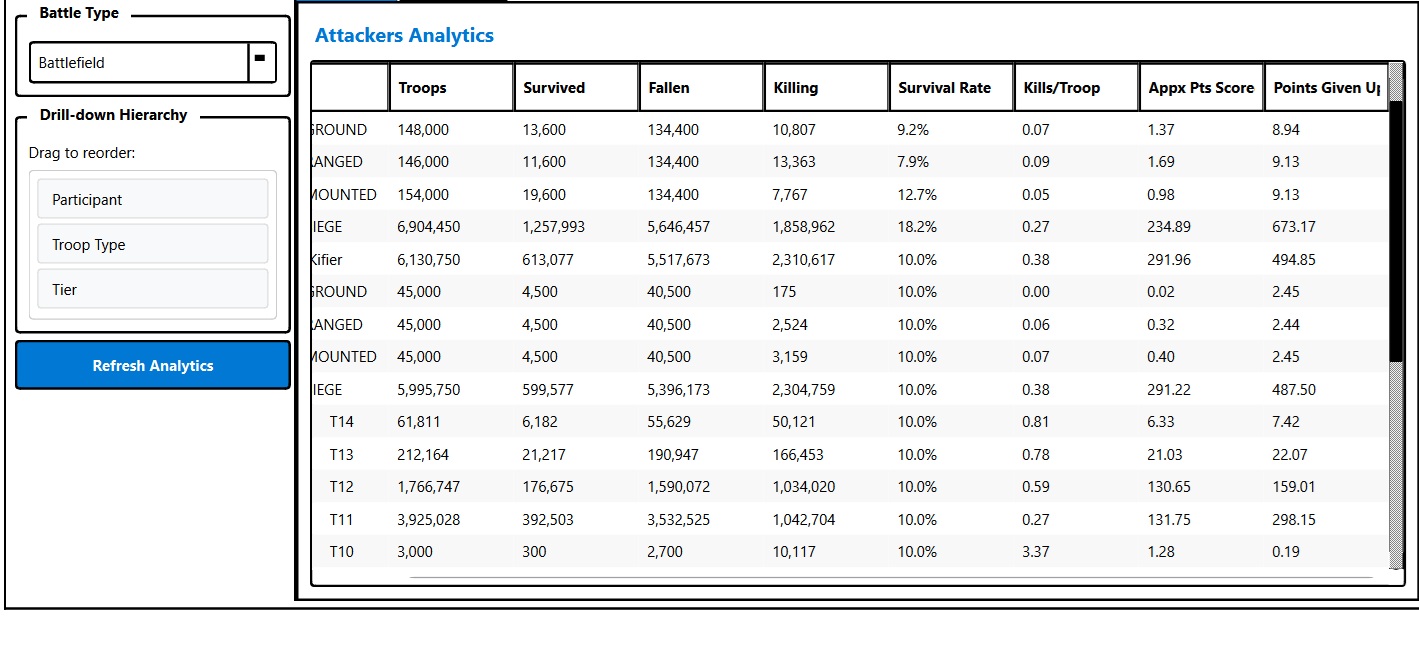
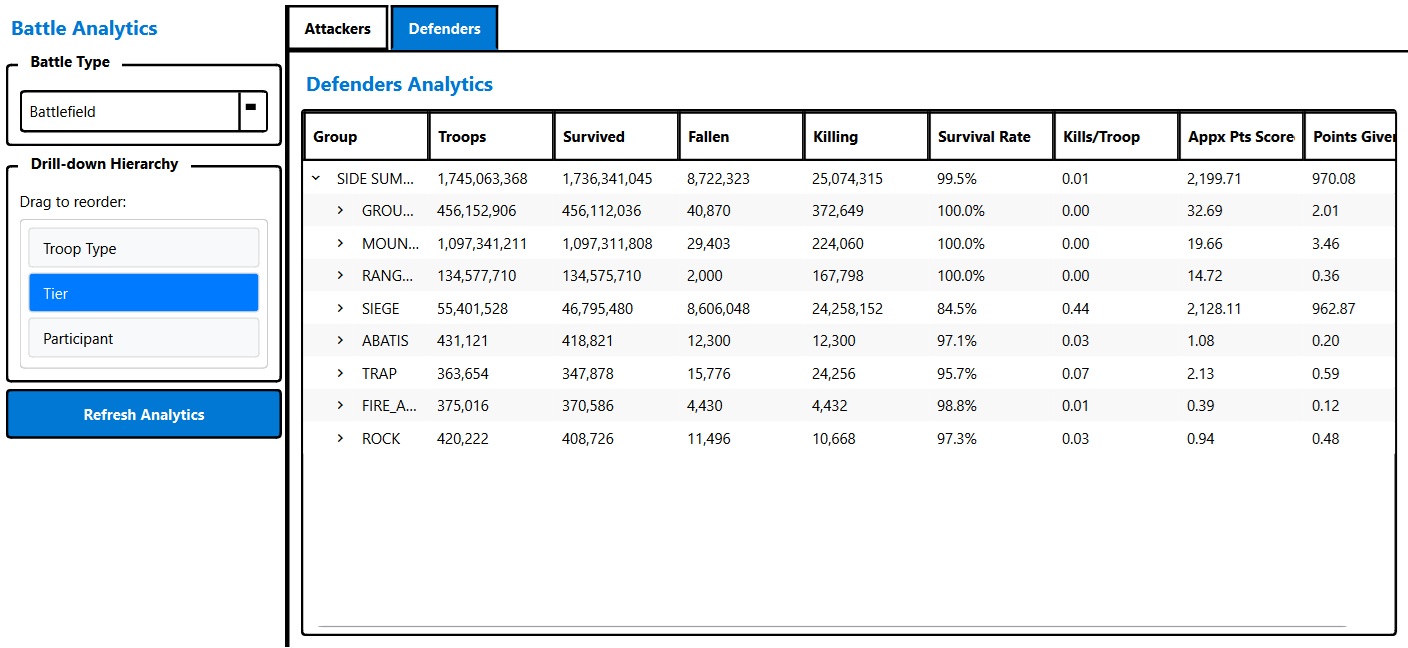
Analytics let you organize a report by participant, troop type, or tier, and reorder that hierarchy as you go. Identify ways to improve defense and get more out of attacks. Compare rally contributors and reinforcement marches across the alliance library — the comparisons that stay out of reach while every fight sits on its own screen. Customizable visualizations show where you are getting kills and where you are giving up points — the half of the trade the in-game scoreboard never reports.
None of these columns is a new measurement of the fight. They are the fight’s own numbers, finally sitting next to each other.
Attacker analytics across a whole battlefield, drilled down by participant, then troop type, then tier. Appx Pts Score and Points Given Up sit in adjacent columns — the two halves of the trade. Click to enlarge.The defender side of the same battlefield, with the drill-down reordered to troop type then tier. The side summary opens into every layer that was on the tile, including abatis, traps, and rocks. Click to enlarge.The same numbers as a curve: survived, killing, and fallen by tier, with Points Given Up on the second axis. Click to enlarge.
Alliance groups
If multiple users from the same alliance subscribe, they can join up in Tactica to share a library of reports and split who scans them in. Tactica keeps reports indefinitely — there is no storage cap. Battlefield Analyst then focuses on one battlefield at a time; the more of that battlefield’s battles you scan, the more there is to navigate. View-only alliance members can use the shared library without an emulator.
Bulk read is built for that split: if connected alliance members set up mailbox sweeps of the same battlefield at the same time, Tactica coordinates between them so the same report is not scanned twice. You maximize coverage without duplicating the minutes each scan takes.
After the fight, notes, bookmarked series, and sharing let the team study full report details outside the game — not just an opening screenshot.
The original demo
This is the launch demo: analytics and visualizations, with a report import running in the background. It predates Fast Read and Battlefield Analyst, so read it as where Tactica started rather than what the loop looks like now — the real-time Fast Read clip earlier on this page is the current import path.
Start with your next battlefield.
Install Tactica, create an account, and start the trial. After your next fight, favorite the reports, import them, and read the summary while the callouts are still in people’s heads. Battlefields come around more than once a week. Trial includes full feature access.
New customers can start with a 7-day trial. Plans start at $14.99/month.
Elsewhere, for the hours you are not at the game: Tactica only reads what already happened, after the fight. A different problem is the time nobody is at the device — Evony's Rally Card stops joining once offline stamina runs out at 2K, and gathering, dailies, and shields stop with it. iScope runs those from the cloud, with nothing left open on a phone or PC. It is a separate service, not part of Tactica. Any automation carries its own account risk; their site states their terms.